Content
- Legibility and Readability are Related, but They are Not the Same Thing
- Typography Determines how Readers Enter the Content
- Readable Writing Needs an Information Hierarchy Too
- The Best Font Cannot Compensate for Unnecessary Complexity
- AI-assisted Writing Creates a New Kind of Readability Problem
- Use an AI Humanizer Before the Final Design Pass
- Line Length Can Make Strong Writing Harder to Read
- Spacing Gives Ideas Room to Separate
- Typography Should Support Tone Without Overwhelming it
- Mobile Reading Exposes Weak Decisions Quickly
- Good Readability Happens Before and After the Font Choice
Why Readable Writing Needs More Than Good Typography
Good typography can invite readers in before they process a single sentence.
A clear typeface, comfortable spacing, and strong visual hierarchy guide the eye and organize information. They make long articles feel approachable, highlight key ideas, and reduce the visual effort required to move through the text.
Yet design cannot rescue writing that is difficult to understand.
A page can feature an excellent font, generous line spacing, and a clean column width, yet still feel exhausting if the sentences are overly formal, repetitive, or packed with abstract language. The reverse is equally true. Clear writing becomes harder to follow when typography creates long lines, cramped spacing, poor contrast, or weak hierarchy.
Readability lives at the intersection of language and presentation.
Writers shape the idea. Editors shape how easily that idea is understood. Typography shapes how comfortably the reader moves through it.
The strongest digital content gets all three working together.
Legibility and Readability are Related, but They are Not the Same Thing
Typography discussions often use the terms legibility and readability interchangeably, even though they describe different parts of the reading experience.
Legibility is largely about recognizing individual characters and words. Typeface design, letterforms, size, weight, contrast, and spacing can all affect how easily a reader identifies what is on the page.
Readability is broader. It includes how easily someone can move through sentences, paragraphs, and complete ideas.
A beautifully legible sentence can still be difficult to read:
The implementation of the aforementioned methodology facilitates the optimization of information-processing outcomes.
Every letter may be perfectly clear. The sentence itself is doing too much work.
A more readable version could be:
This method helps people process information more easily.
Nothing about the typography had to change. The improvement came from the language.
This distinction is useful because visual design teams sometimes try to solve content problems through presentation alone.
A larger font may make dense prose more visible, but it does not make the underlying idea simpler.
Typography Determines how Readers Enter the Content
Typography cannot rewrite a difficult paragraph, however, it strongly influences whether readers engage with the paragraph in the first place.
Heading size signals where a new idea begins. White space separates concepts. Line length affects how comfortably the eye moves from the end of one line to the beginning of the next. Differences in weight and scale create hierarchy.
MIT’s typography guidance emphasizes this role of contrast and hierarchy. It recommends keeping typeface choices relatively simple and using size, weight, style, and other visual differences to establish meaningful contrasts rather than adding variation for its own sake.
That principle matters because readability is often damaged by overdesign.
Using five fonts, excessive bolding, decorative text effects, and inconsistent headings may create visual interest, but the reader is forced to spend more effort deciding what matters.
Good typography should reduce those decisions.
The visual structure should quietly tell the reader, “Start here. This is the main idea. This detail belongs underneath it.”
When design does that well, the language has more room to work.
Readable Writing Needs an Information Hierarchy Too
Writers also create hierarchy, even when no visual design is involved.
The opening sentence tells the reader what the paragraph is about. Supporting sentences develop that idea. Transitions explain how one point relates to another. Examples make abstract claims concrete.
If every sentence carries equal weight, the paragraph becomes difficult to scan.
Consider:
Businesses increasingly use artificial intelligence for customer communication. Artificial intelligence tools can generate text quickly. Generated text may contain repetitive patterns. Repetition can affect readability. Businesses should review generated text carefully.
The paragraph is clear at sentence level, but the relationship between the ideas is weak.
A stronger version might read:
Businesses increasingly use AI to produce customer-facing content, but speed does not guarantee readability. Generated drafts can fall into repetitive sentence patterns or rely on vague language, so human review is still needed before the text reaches an audience.
The revised version establishes a hierarchy: context first, problem second, consequence third.
Typography can then reinforce that hierarchy through headings, emphasis, and spacing.
The design and the writing are doing different jobs toward the same goal.
The Best Font Cannot Compensate for Unnecessary Complexity
Writers sometimes assume sophisticated subjects require sophisticated sentences.
That is not necessarily true.
Complex ideas may require specialist terminology, detailed explanation, or careful qualifications. They do not automatically require long noun phrases or indirect constructions.
Official guidance from the UK Office for National Statistics recommends plain language even for expert audiences, noting that readers generally prefer clear wording, simpler sentence structures, and content organized around their needs.
That principle works particularly well in digital environments.
Online readers often scan before committing to close reading. If the language is immediately dense, visual improvements may only delay the moment when the reader gives up.
Compare:
The utilization of enhanced visual formatting methodologies can facilitate improved comprehension outcomes.
with:
Better formatting can make information easier to understand.
The second sentence is not less professional. It simply removes words that were standing between the reader and the idea.
Clarity is not the absence of expertise.
It is evidence that the writer understands the subject well enough to explain it.
AI-assisted Writing Creates a New Kind of Readability Problem
Generative AI has made it much easier to produce clean, grammatically correct text at scale.
That creates an interesting challenge for designers and editors. The draft may look finished before it actually reads well.
Generated prose often arrives with complete sentences, logical transitions, and consistent tone. Yet across a longer article, those strengths can become weaknesses.
Paragraphs may follow similar structures, transitions may repeat, and abstract phrases may appear frequently because they work safely across many contexts.
The result can be visually polished and linguistically monotonous.
A designer might break the article into shorter sections or add more white space, which can improve the reading experience. But if the language remains repetitive, the deeper problem is still present.
That is where content revision has to happen before typography can fully do its job.
Use an AI Humanizer Before the Final Design Pass
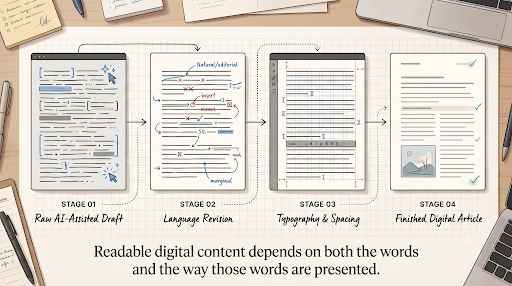
Once the meaning and structure of the content are established, an AI Humanizer can help revise passages that sound stiff, repetitive, or more formal than the audience requires.
This is especially useful before the final visual design pass because changes in language affect the page itself. A rewritten sentence may become shorter.
A dense paragraph may turn into two clearer paragraphs. A heading may need fewer words. A callout may become concise enough to fit without shrinking the type.
Those changes can improve both linguistic and visual readability.
The key is to treat the tool as an editing layer rather than as the final authority. The revised text still needs to preserve the original facts, qualifications, terminology, and intended tone.
If a technical phrase has a specific meaning, replacing it with a simpler synonym may reduce accuracy. If a sentence says something may happen, a smoother rewrite should not quietly turn that possibility into certainty.
The strongest workflow is therefore collaborative: improve the wording, then check the meaning, then design around the version that genuinely communicates better.
Line Length Can Make Strong Writing Harder to Read
Even well-edited language can become uncomfortable when lines are too long.
When the eye reaches the end of a very wide text column, it has farther to travel before finding the beginning of the next line. Over multiple paragraphs, that can make sustained reading more tiring.
The Web Content Accessibility Guidelines address this issue in their visual-presentation guidance. W3C notes that users should be able to view blocks of text at a width of no more than about 80 characters or glyphs and adjust spacing without losing content or functionality
The broader lesson is not that every website needs one universal column width. Different fonts, devices, languages, and contexts affect what feels comfortable.
But line length should be intentional.
A desktop layout should not simply stretch body copy across all available screen space because the screen is wide. A narrower reading column often creates a more controlled rhythm and makes the content easier to follow.
This is where writing and typography meet again. Shorter sentences are not automatically readable if they are presented badly, and excellent line length cannot save sentences that contain too many ideas.
Spacing Gives Ideas Room to Separate
Readers need to recognize where one unit of information ends and another begins.
Paragraph spacing, line height, and white space around headings all help create those boundaries visually.
W3C’s accessibility guidance on text spacing notes that some readers benefit from increased spacing between lines, words, characters, and paragraphs, and digital layouts should remain usable when users adjust those settings.
This is more than an accessibility concern.
Crowded text often feels harder to read for everyone because visual boundaries become less obvious. At the same time, excessive spacing can disconnect ideas that belong together.
Designers should therefore think about spacing semantically.
A larger gap should signal a larger change in thought. Closely related text should remain visually connected. Headings should clearly belong to the paragraphs that follow them.
Good spacing is not decoration. It communicates structure.
Typography Should Support Tone Without Overwhelming it
Typeface choices also contribute to the emotional character of content.
A geometric display font may feel modern and technical. A serif typeface may give long-form editorial content a more traditional quality. Rounded forms can feel approachable, while condensed uppercase text may communicate urgency or strength.
Those associations can support the message, but they should not be asked to create a personality that the writing itself does not contain.
A playful font cannot make bureaucratic prose conversational. A serious serif cannot make unsupported claims authoritative.
The language and the typography need to point in the same direction.
If a brand wants to sound friendly, the writing should use clear and approachable language before the design adds visual warmth. If the content is technical, typography can create order and confidence while the prose handles precision.
The result feels coherent because tone is being built at more than one level.
Mobile Reading Exposes Weak Decisions Quickly
Typography that works on a desktop may fail on a phone.
Columns become narrower. Headings wrap differently. Tables may become difficult to navigate. A paragraph that looked manageable on a large screen may suddenly fill most of a mobile display.
TextToFont’s own recent guidance on AI-translated PDFs makes a similar point: text length, line breaks, spacing, font support, and layout all need to be checked after language changes because visually correct source content can become difficult to read when the words change.
The same principle applies to edited web copy.
A rewritten heading can become longer. A translated phrase can change the height of a button. A humanized paragraph may use shorter sentences but more paragraph breaks.
Content and layout should therefore be reviewed together on the actual devices where people will read them.
Responsive design is not only about moving boxes around the screen.
It is also about preserving a comfortable reading experience when the relationship between words and space changes.
Good Readability Happens Before and After the Font Choice
Typography matters enormously.
The right typeface, hierarchy, contrast, spacing, and line length can make information easier to navigate and more comfortable to consume. Poor typographic decisions can make even strong writing unnecessarily difficult.
But readability begins before the font is selected.
It begins with deciding what the reader needs to know, choosing language that communicates that idea directly, organizing related thoughts clearly, and removing complexity that does not serve a purpose.
Only then can typography reveal that structure visually.
The strongest digital content does not ask whether writing or design is more important. It treats them as parts of the same reading experience.
The words should make the idea easy to understand. The typography should make the words easy to follow. When both succeed, the reader rarely notices either one.
They simply keep reading.

TextToFont Editorial Team
The TextToFont Editorial Team publishes practical guides, tutorials, contributed and partner content covering typography, font generators, Unicode text styles, digital design, creative software, and emerging technology. Each article is reviewed for relevance, accuracy, clarity, and usefulness before publication on TextToFont.